
Notice
Recent Posts
Recent Comments
Link
| 일 | 월 | 화 | 수 | 목 | 금 | 토 |
|---|---|---|---|---|---|---|
| 1 | 2 | 3 | 4 | 5 | 6 | 7 |
| 8 | 9 | 10 | 11 | 12 | 13 | 14 |
| 15 | 16 | 17 | 18 | 19 | 20 | 21 |
| 22 | 23 | 24 | 25 | 26 | 27 | 28 |
Tags
- 자바공부
- Flutter Toy Project
- TCA
- 영화리뷰
- java
- IOS
- 키노
- 백준
- sopt ios
- swift concurrency
- 영화
- 티스토리챌린지
- 코딩공부
- 새벽녘 소소한 기록
- 프로그래머스
- 토이프로젝트
- 독서일기
- SWIFT
- 리뷰
- 영화일기
- 자바 스터디
- 영화기록
- 자바
- 오블완
- Flutter
- sopt 35기
- 일기
- 영화후기
- 플러터
- SOPT
Archives
- Today
- Total
새벽의 기록
[iOS] TCA Zero-to-Hero #4 - Dependencies: 의존성 주입과 통제 본문
목표: TCA의 @Dependency를 사용해보기
1. Task.sleep 수정하기
지금 코드에 있는 Task.sleep은 실제 시간을 쓴다. 이게 왜 문제일까?
나중에 테스트 코드를 짤 때, 테스트가 끝날 때까지 진짜 1초를 멍하니 기다려야 하기 때문이다. (테스트가 100개면 100초...)
TCA의 @Dependency중 ContinuousClock를 사용해서 개선해보자.
import SwiftUI
import ComposableArchitecture

@Reducer
struct CounterFeature {
    @ObservableState
    struct State: Equatable {
        var count = 0
        var isLoading = false
        var isTimerEnabled = false
        var memo = ""
    }

    enum Action: BindableAction {
        case incrementButtonTapped
        case decrementButtonTapped
        case delayedIncrementButtonTapped
        case incrementResponse
        case binding(BindingAction<State>)
    }


    // \.continuousClock은 TCA가 기본으로 제공하는 시간 관련 도구
    @Dependency(\.continuousClock) var clock

    var body: some Reducer<State, Action> {

        BindingReducer()

        Reduce { state, action in
            switch action {
            case .incrementButtonTapped:
                state.count += 1
                return .none

            case .decrementButtonTapped:
                state.count -= 1
                return .none

            case .delayedIncrementButtonTapped:
                state.isLoading = true

                // Task.sleep 대신 clock.sleep을 사용
                return .run { send in
                    // try await Task.sleep(nanoseconds: 1_000_000_000) // ❌ 이제 이거 안 씀
                    try await clock.sleep(for: .seconds(1))             // ✅ TCA continuousClock 사용

                    await send(.incrementResponse)
                }

            case .incrementResponse:
                state.isLoading = false // 로딩 끝
                state.count += 1
                return .none


            // "들어온 binding 액션이 정확히 'isTimerEnabled' 변수를 건드린 경우라면 이쪽으로 와라"
            case .binding(\.isTimerEnabled):
                print("타이머 스위치가 변경되었습니다: \(state.isTimerEnabled)")
                return .none

            // "위에서 걸러지지 않은 나머지 모든 binding 액션은 여기서 처리해라"
            case .binding:
                return .none
            }
        }
    }

}

struct CounterView: View {
    @Bindable var store: StoreOf<CounterFeature>

    var body: some View {
        VStack {
            if store.isLoading {
                ProgressView().padding()
            } else {
                Text("\(store.count)")
                    .font(.largeTitle)
                    .padding()
            }

            HStack {
                Button("-") { store.send(.decrementButtonTapped) }
                    .font(.largeTitle)
                    .padding()
                    .background(Color.black.opacity(0.1))
                    .cornerRadius(10)

                Button("+") { store.send(.incrementButtonTapped) }
                    .font(.largeTitle)
                    .padding()
                    .background(Color.black.opacity(0.1))
                    .cornerRadius(10)

                Button("1초 뒤") { store.send(.delayedIncrementButtonTapped) }
                    .font(.headline)
                    .padding()
                    .background(Color.blue.opacity(0.2))
                    .cornerRadius(10)
            }
            .padding()

            Divider().padding()

            Toggle("타이머 활성화", isOn: $store.isTimerEnabled)
                .padding()
                .background(store.isTimerEnabled ? Color.green.opacity(0.2) : Color.gray.opacity(0.1))
                .cornerRadius(8)

            TextField("메모를 입력하세요", text: $store.memo)
                .textFieldStyle(.roundedBorder)
                .padding(.top)

            Text("입력 중: \(store.memo)")
                .font(.caption)
                .foregroundStyle(.gray)
        }
        .padding()
    }
}

#Preview {
    CounterView(
        store: Store(initialState: CounterFeature.State()) {
            CounterFeature()
                ._printChanges()
        }
    )
}
당장은 Task.sleep과 똑같아 보이지만 이렇게 의존성을 주입해두면, 나중에 프리뷰나 테스트 환경에서 시간을 조작할 수 있다.
예를 들어, 프리뷰에서 1초 기다리기 싫다면? App 파일이나 Preview 코드에서 이렇게 주입만 해주면 된다.
// 예시: 테스트할 때는 시간이 즉시(immedately) 흐르게 설정 가능
CounterFeature()
    .dependency(\.continuousClock, .immediate)
    // 이렇게 하면 1초 기다리는 코드가 있어도 즉시 실행된다
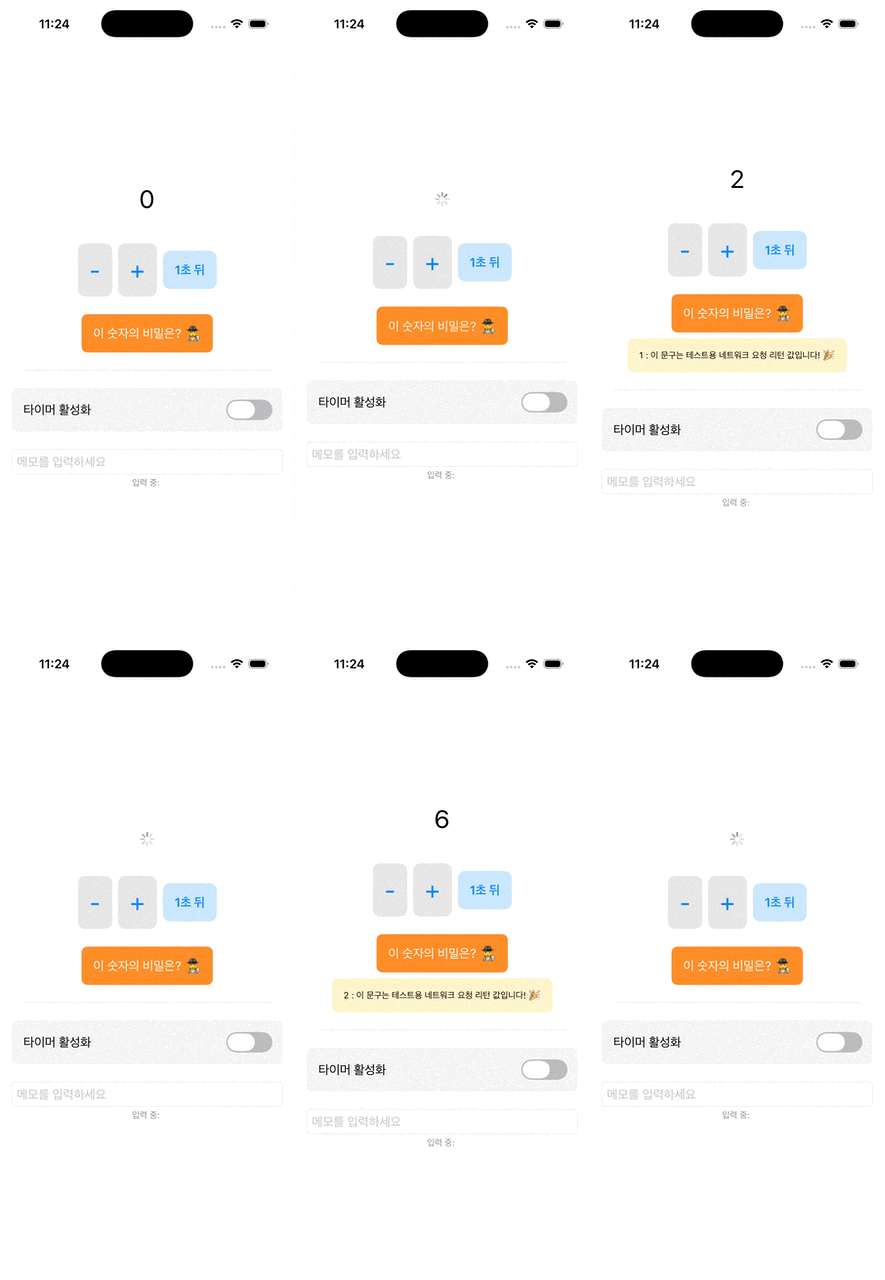
2. 단순한 시계 말고, 서버 통신 같은 진짜 의존성은 어떻게 만들지?
간단하게 숫자에 대한 재밌는 사실(Number Fact)을 가져오는 API를 붙여보자.
import Foundation

import ComposableArchitecture

// 1. API가 할 일을 정의 (Protocol 대신 struct + closure 패턴을 주로 사용)
struct NumberFactClient {
    var fetch: (Int) async throws -> String
}

// 2. 의존성 키(Key) 등록
extension DependencyValues {
    var numberFact: NumberFactClient {
        get { self[NumberFactClient.self] }
        set { self[NumberFactClient.self] = newValue }
    }
}

// 3. 실제 구현체와 가짜 구현체 등록
extension NumberFactClient: DependencyKey {
    // 실제 앱에서 쓸 'Live' 구현
    static let liveValue = Self(
        fetch: { number in
//            let urlString = "http://numbersapi.com/\(number)"
//            print("📡 [Network] 요청 시작: \(urlString)")
//
//            do {
//                guard let url = URL(string: urlString) else {
//                    print("❌ [Network] URL 생성 실패: \(urlString)")
//                    throw URLError(.badURL)
//                }
//
//                let (data, response) = try await URLSession.shared.data(from: url)
//
//                if let httpResponse = response as? HTTPURLResponse {
//                    print("📡 [Network] 상태 코드: \(httpResponse.statusCode)")
//                }
//
//                let resultString = String(decoding: data, as: UTF8.self)
//                print("✅ [Network] 데이터 수신 성공: \(resultString)")
//
//                return resultString
//            } catch {
//                print("❌ [Network] 통신 에러 발생: \(error)")
//                throw error
//            }

            try await Task.sleep(nanoseconds: 1_000_000_000)

            // numbersapi 서버가 죽어있어서 테스트용으로 작성
            print("✅ [Mock] 가짜 데이터 리턴 성공")
            return "\(number) : 이 문구는 테스트용 네트워크 요청 리턴 값입니다! 🎉"
        }
    )

    // 프리뷰에서 쓸 가짜 데이터
    static let testValue = Self(
        fetch: { "\($0) is a good number." }
    )
}
import SwiftUI
import ComposableArchitecture
@Reducer
struct CounterFeature {
@ObservableState
struct State: Equatable {
var count = 0
var isLoading = false
var isTimerEnabled = false
var memo = ""
var fact: String?
}
enum Action: BindableAction {
case incrementButtonTapped
case decrementButtonTapped
case delayedIncrementButtonTapped
case incrementResponse
case binding(BindingAction<State>)
case factButtonTapped
case factResponse(String)
}
// \.continuousClock은 TCA가 기본으로 제공하는 시간 관련 도구
@Dependency(\.continuousClock) var clock
// 방금 만든 API Client 주입
@Dependency(\.numberFact) var numberFact
var body: some Reducer<State, Action> {
BindingReducer()
Reduce { state, action in
switch action {
case .incrementButtonTapped:
state.count += 1
return .none
case .decrementButtonTapped:
state.count -= 1
return .none
case .delayedIncrementButtonTapped:
state.isLoading = true
// Task.sleep 대신 clock.sleep을 사용
return .run { send in
// try await Task.sleep(nanoseconds: 1_000_000_000) // ❌ 이제 이거 안 씀
try await clock.sleep(for: .seconds(1)) // ✅ TCA continuousClock 사용
await send(.incrementResponse)
}
case .incrementResponse:
state.isLoading = false // 로딩 끝
state.count += 1
return .none
// "들어온 binding 액션이 정확히 'isTimerEnabled' 변수를 건드린 경우라면 이쪽으로 와라"
case .binding(\.isTimerEnabled):
print("타이머 스위치가 변경되었습니다: \(state.isTimerEnabled)")
return .none
// "위에서 걸러지지 않은 나머지 모든 binding 액션은 여기서 처리해라"
case .binding:
return .none
// 사실 가져오기 버튼 클릭
case .factButtonTapped:
print("🟢 [Reducer] 버튼 클릭됨. 통신 시도.")
state.fact = nil
state.isLoading = true
return .run { [count = state.count] send in
print("🏃 [Reducer] .run 블록 진입")
do {
let fact = try await numberFact.fetch(count)
print("📩 [Reducer] 결과 받음, Action 발송: \(fact)")
await send(.factResponse(fact))
} catch {
print("🔥 [Reducer] 에러 발생 (catch): \(error)")
await send(.factResponse("에러: \(error.localizedDescription)"))
}
}
// 결과 받아서 화면에 표시
case .factResponse(let fact):
print("🏁 [Reducer] .factResponse 도착: \(fact)")
state.isLoading = false
state.fact = fact
return .none
}
}
}
}
struct CounterView: View {
@Bindable var store: StoreOf<CounterFeature>
var body: some View {
VStack {
if store.isLoading {
ProgressView().padding()
} else {
Text("\(store.count)")
.font(.largeTitle)
.padding()
}
HStack {
Button("-") { store.send(.decrementButtonTapped) }
.font(.largeTitle)
.padding()
.background(Color.black.opacity(0.1))
.cornerRadius(10)
Button("+") { store.send(.incrementButtonTapped) }
.font(.largeTitle)
.padding()
.background(Color.black.opacity(0.1))
.cornerRadius(10)
Button("1초 뒤") { store.send(.delayedIncrementButtonTapped) }
.font(.headline)
.padding()
.background(Color.blue.opacity(0.2))
.cornerRadius(10)
}
.padding()
Button("이 숫자의 비밀은? 🕵️♀️") {
store.send(.factButtonTapped)
}
.padding()
.background(Color.orange)
.foregroundColor(.white)
.cornerRadius(8)
if let fact = store.fact {
Text(fact)
.font(.caption)
.multilineTextAlignment(.center)
.padding()
.background(Color.yellow.opacity(0.2))
.cornerRadius(8)
}
Divider().padding()
Toggle("타이머 활성화", isOn: $store.isTimerEnabled)
.padding()
.background(store.isTimerEnabled ? Color.green.opacity(0.2) : Color.gray.opacity(0.1))
.cornerRadius(8)
TextField("메모를 입력하세요", text: $store.memo)
.textFieldStyle(.roundedBorder)
.padding(.top)
Text("입력 중: \(store.memo)")
.font(.caption)
.foregroundStyle(.gray)
}
.padding()
}
}
#Preview {
CounterView(
store: Store(initialState: CounterFeature.State()) {
CounterFeature()
._printChanges()
}
)
}
이렇게 외부 의존성을 너무나 쉽게 끌어다 쓸 수 있는데...
이거 그냥 스유에 environmentObject 랑 같은 느낌 아닌가....
이러면 결국 아무 곳에서나 사용할 수도 있다는 뜻이니까.. 의존성 부분에 관해서는 TCA 사용하면서 고민을 정말 많이 해봐야 할 것 같다.
흠... 아직은 감이 잘 안잡히네
swiftui environmentObject랑 tca @Dependency 비교해보기
'[iOS]' 카테고리의 다른 글
| [iOS] 노치 시뮬레이터에서 발생하는 rdar:45025538 버그 (0) | 2026.01.06 |
|---|---|
| [iOS] TCA Zero-to-Hero #5 - Composition: 쪼개진 뷰와 리듀서 합치기 (Scope) (0) | 2025.12.27 |
| [iOS] TCA Zero-to-Hero #3 - Binding: TextField, Toggle 등 UI 바인딩 처리 (0) | 2025.12.21 |
| [iOS] TCA Zero-to-Hero #2 - Effect: 비동기 처리와 외부 통신 (0) | 2025.12.21 |
| [iOS] TCA Zero-to-Hero #1 - State, Action, Reducer의 단방향 데이터 흐름 이해 (0) | 2025.12.20 |
'[iOS]' Related Articles
more


Comments